
When registered in a website, we usually need to confirm the register. This time I used SendGrid to send the confirmation via templates in a ASP.NET core project.
Easy way to send a simple email
Before using the SendGrid service, we need the following preparations:
- Have an account in SendGrid.
- Get the API key
- Set a template
Notice, the API key just show you once, keep it properly.
The template I used is dynamic template which can replace some words in the template. It's:
  <html>
    <head>
      <title></title>
    </head>
    <body>
        Hello {{name}},
        <br /><br/>
        registered successful!
        <br /><br/>
        Please confirm your email address using this link:
        <a href="{{redirect}}"> Comfirm Your Account </a>
        <br /><br/>
        This link will expired in 7 days.
    </body>
  </html>
You can see, the "name", and "redirect" can be replaced when you set your codes in C# like this:
public class TemplateEmailData
    {
        [JsonProperty("subject")]
        public string Subject { get; set; }
        [JsonProperty("name")]
        public string Name { get; set; }
        [JsonProperty("redirect")]
    }
So the SendGrid can handle the request.
Before writing codes, we need to install SendGrid package. In package manager console, use command:
PM> Install-Package SendGrid
Then, the codes are:
[HttpPost]
[AllowAnonymous]
public async Task<IActionResult> Register(RegisterViewModel model)
        {
            if (ModelState.IsValid)
            {
               // other codes...

                    var dynamicTemplateData = new TemplateEmailData
                    {
                        Subject = "send grid dynamic",
                        Name = "Linda",
                        RedirectUrl =
                        "https://localhost:44356/account/"
                    };
                    emailService.SendEmail(dynamicTemplateData);
                // other codes...
            }
            return View(model);
        }
 public async void SendEmail(TemplateEmailData templateEmailData)
{
            try
            {
                // your own SendGridApiKey
                var client = new SendGridClient(SendGridApiKey);
                var msg = new SendGridMessage();
                msg.SetFrom(new EmailAddress("test@gmail.com", "t"));
                msg.AddTo(new EmailAddress("test@gmail.com", "Linda"));
                msg.SetTemplateId(TemplateID);
				// You own TemplateID
                msg.SetTemplateData(templateEmailData);
                var response = await client.SendEmailAsync(msg);
            }
            catch (Exception e)
            {
                throw;
}
The interesting thing is that we don't need a credential for this service, just need an API key and template ID.
Iterations for template
When we need to dynamically generate iterations from a list or array, the template is looks like this:
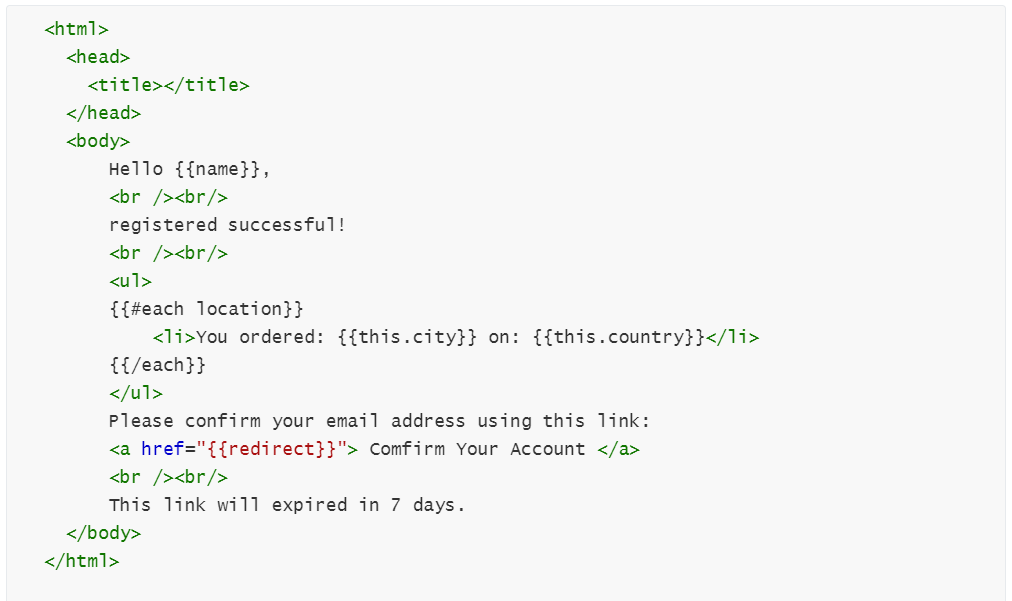
And the codes constantly changed to:
public class TemplateEmailData
    {
        [JsonProperty("subject")]
        public string Subject { get; set; }
        [JsonProperty("name")]
        public string Name { get; set; }
        [JsonProperty("redirect")]
        public string RedirectUrl { get; set; }
        [JsonProperty("location")]
        public List<Location> Locations { get; set; }
    }
    public class Location
    {
        [JsonProperty("city")]
        public string City { get; set; }
        [JsonProperty("country")]
        public string Country { get; set; }
    }
Source
https://sendgrid.com/docs/for-developers/sending-email/using-handlebars/#iterations
https://github.com/sendgrid/sendgrid-csharp