<?xml version="1.0" encoding="utf-8"?>
<feed xmlns="http://www.w3.org/2005/Atom">
    <id>https://Helena-Li.github.io</id>
    <title>Web development</title>
    <updated>2021-06-10T23:51:30.042Z</updated>
    <generator>https://github.com/jpmonette/feed</generator>
    <link rel="alternate" href="https://Helena-Li.github.io"/>
    <link rel="self" href="https://Helena-Li.github.io/atom.xml"/>
    <logo>https://Helena-Li.github.io/images/avatar.png</logo>
    <icon>https://Helena-Li.github.io/favicon.ico</icon>
    <rights>All rights reserved 2021, Web development</rights>
    <entry>
        <title type="html"><![CDATA[Understand Auth0 (2) - Customise Login within classic universal login]]></title>
        <id>https://Helena-Li.github.io/post/understand-auth0-2-customise-login-within-classic-universal-login</id>
        <link href="https://Helena-Li.github.io/post/understand-auth0-2-customise-login-within-classic-universal-login">
        </link>
        <updated>2021-06-11T03:50:22.000Z</updated>
        <content type="html"><![CDATA[<h1 id="understand-auth0-2-customise-login-within-classic-universal-login">Understand Auth0 (2) - Customise Login within classic universal login</h1>
<p>Most of the time, there're requirements on customise login page. For build in login page, there<br>
are new universal login and classic universal login. Because there are conflict if we open customise login page and use new universal login, we talk about the classic one.</p>
<p>According to the depth of the requirements to customise login page, I category it into 3 layers:</p>
<ol>
<li>basic universal login custom</li>
<li>customise universal login with 'lock'</li>
<li>customise universal login with 'custom login form'</li>
</ol>
<p>Also, there's another option to use management API to customise the login page, we haven't touch it yet. So we focus on changes of Auth0 platform.</p>
<h2 id="basic-universal-login-custom">Basic universal login custom</h2>
<p>Both for classic and new universal login, people can change logo, page background color and login button color on dashboard. we could make changes in dashboard -&gt; branding -&gt; universal login -&gt; setting.</p>
<p>Also, can change logo on tenant setting.</p>
<h2 id="customise-universal-login-with-lock">Customise universal login with 'lock'</h2>
<p>If basic custom is not enough, we could switch on custom login button in dashboard -&gt; branding -&gt; universal login -&gt; login.</p>
<p>The default template is lock. Since the login form is written in lock, we need to use the provided configure options to made the change.</p>
<p>Auth0 provides lock configure options, or we could directly write html/css/jQuery in the script.</p>
<h3 id="lock-configuration">Lock configuration</h3>
<p>Refer https://auth0.com/docs/libraries/lock/lock-configuration, we can configure login form based on the provided options. these fields are commonly touched:</p>
<ul>
<li>add addition sign up fields</li>
<li>language Dictionary to change text</li>
<li>allow sign up</li>
<li>must accept terms</li>
</ul>
<h4 id="addition-sign-up-fields">Addition sign up fields</h4>
<p>Addition sign up fields will directly add into user metadata at the pre-register hook. The type of the fields could be specified.</p>
<pre><code>var options = { 
	additionalSignUpFields: [
	{ 
		name: &quot;address&quot;, 
		placeholder: &quot;enter your address&quot;, 
		// The following properties are optional 
		icon: &quot;https://example.com/assests/address_icon.png&quot;, 
		prefill: &quot;street 123&quot;, 
		validator: function(address) { 
			return { 
				valid: address.length &gt;= 10, 
				hint: &quot;Must have 10 or more chars&quot; // optional 
			}; 
		}
	}, 
	{ 
		name: &quot;full_name&quot;, 
		placeholder: &quot;Enter your full name&quot; 
	},
	{ 
		type: &quot;select&quot;, 
		name: &quot;location&quot;, 
		placeholder: &quot;choose your location&quot;, 
		options: [ 
			{value: &quot;us&quot;, label: &quot;United States&quot;}, 
			{value: &quot;fr&quot;, label: &quot;France&quot;}, 
			{value: &quot;ar&quot;, label: &quot;Argentina&quot;} 
		], 
		// The following properties are optional  
		icon: &quot;https://example.com/assests/location_icon.png&quot;, 
		prefill: &quot;us&quot; 
	}] 
}
</code></pre>
<h4 id="language-dictionary-to-change-text">Language Dictionary to change text</h4>
<pre><code>languageDictionary: {
                loginLabel: &quot;Login&quot;,
                loginSubmitLabel: &quot;Login&quot;,
                signUpLabel: &quot;Activate&quot;,
                signUpSubmitLabel: &quot;Activate account&quot;,
                emailInputPlaceholder: &quot;Email&quot;,
                passwordInputPlaceholder: &quot;Password&quot;,
                databaseSignUpInstructions: getContactUsText()
}

var isASite = config.callbackURL.indexOf(&quot;com.a&quot;) &gt; 0;
var getContactUsText = function () {
    var contactLink =
      'Don’t have an account? &lt;a id=&quot;contactLink&quot; target=&quot;_blank&quot; href=&quot;[CONTACT-US-LINK]&quot;&gt;contact us&lt;/a&gt; to sign up'
             
    return isASite
                ? contactLink.replace(&quot;[CONTACT-US-LINK]&quot;, contactA)
                : contactLink.replace(&quot;[CONTACT-US-LINK]&quot;, contactB);
        };
</code></pre>
<h4 id="must-accept-terms">Must accept terms</h4>
<pre><code>languageDictionary = { 
    title: config.dict.signin.title,
    signUpTerms: &quot;I have read and agree with the &lt;a href='https://terms-and-conditions/' target='_blank'&gt;terms &amp; conditions&lt;/a&gt;&quot;
};
mustAcceptTerms: true
</code></pre>
<h3 id="custom-by-htmlcssjquery">Custom by html/css/jQuery</h3>
<p>Although, is not recommended, we could also change everything we want by using plaint html/css/jQuery. We made these changes:</p>
<ul>
<li>add background image</li>
<li>add extra link under login box</li>
<li>add extra fields in login box</li>
</ul>
<h4 id="background-image">Background image</h4>
<pre><code>body{ 
        background-color: #000000; 
        background: url(&quot;https://loginbg.jpg&quot;) no-repeat; 
        background-size: cover; 
    } 
.auth0-lock.auth0-lock.auth0-lock-opened .auth0-lock-overlay { display: none; }
</code></pre>
<h4 id="extra-link-out-of-the-login-box">Extra link out of the login box</h4>
<p>With container can add extra inline content.</p>
<pre><code>
&lt;div id=&quot;hiw-login-container&quot; style=&quot;filter: drop-shadow(0 0 0.75rem black)&quot;&gt;	&lt;/div&gt;
&lt;div style=&quot;text-align: center;&quot;&gt;
   &lt;a target=&quot;_blank&quot; href='https://account'&gt;
	   &lt;div style=&quot;color: white; text-decoration: none;&quot; &gt;
		   Create an Account
	   &lt;/div&gt;
   &lt;/a&gt;
&lt;/div&gt;

&lt;script&gt; 
	var options = { container: 'hiw-login-container' }; 
	// initialize 
	var lock = new Auth0Lock('xxxxxx', '&lt;account&gt;.auth0.com', options); 
	// render 
	lock.show(); 
&lt;/script&gt;
</code></pre>
<h4 id="extra-fields-in-login-box">Extra fields in login box</h4>
<p>Fetch the position where you want to add fields, and then insert your content.</p>
<pre><code> var createExtra = function () {
    var addConfirmField = function () {

    var tag =
         '&lt;div class=&quot;auth0-lock-input-block auth0-lock-input-show-password&quot; &gt;'+
         '&lt;div class=&quot;auth0-lock-input-block auth0-lock-input-password&quot; &gt;'+
         '&lt;div class=&quot;auth0-lock-input-wrap auth0-lock-input-wrap-with-icon&quot; &gt;'+
         '&lt;input class=&quot;confirm-password&quot; name=&quot;confirmPassword&quot; type=&quot;password&quot; placeholder=&quot;Confirm Password&quot; autocomplete=&quot;off&quot; autocapitalize=&quot;off&quot;'
          +
         &quot;&lt;/input&gt;&quot;+
         &quot;&lt;/div&gt;&quot;+
         &quot;&lt;/div&gt;&quot;+
         &quot;&lt;/div&gt;&quot;;
   $(&quot;.auth0-lock-input-show-password&quot;)
                    .parent()
                    .append(tag);
            };
      
   var addConfirmErrorField = function () {

     var tag =
       '&lt;label class=&quot;confirm-password-error&quot; name=&quot;confirmPasswordError&quot;'+
                    '&quot;&gt;' 
                    +&quot; Those passwords didn’t match. Try again.&quot;
                    &quot;&lt;/label&gt;&quot;;
    $(&quot;.auth0-lock-input-show-password&quot;)
                    .parent()
                    .append(tag);
            };

    addConfirmField();
    addConfirmErrorField();
 };
</code></pre>
<h2 id="customise-universal-login-with-custom-login-form">Customise universal login with 'custom login form'</h2>
<p>After switch on custom login, there's a template dropdown. If select 'custom login form', and preview, can see it's plaint Javascript written page. We can write whatever we want here.</p>
]]></content>
    </entry>
    <entry>
        <title type="html"><![CDATA[Understand Auth0 (1) - API and APP]]></title>
        <id>https://Helena-Li.github.io/post/understand-auth0-1-api-and-app</id>
        <link href="https://Helena-Li.github.io/post/understand-auth0-1-api-and-app">
        </link>
        <updated>2021-06-10T18:17:14.000Z</updated>
        <content type="html"><![CDATA[<p>Understand Auth0 (1) - API and APP<br>
Auth0 is a platform to implement authentication and authorisation. Through auth0, you can easily sign up/ login users in your APP.</p>
<h2 id="first-touch-on-auth0-app">First touch on Auth0 - APP</h2>
<p>You first touch on Auth0 should only be Application feature on dashboard. There're different types of App, the common used ones for me are &quot;Machine to Machine&quot; and &quot;Single Page&quot; type.</p>
<ol>
<li>Single page: use this application credential in your frontend app, ex: angular, react, etc.</li>
<li>Machine to machine: use this to get token from this tenant.</li>
</ol>
<h4 id="when-to-use-single-page">When to use Single page</h4>
<p>When you need to authenticate users with your front-end APP, you can create this type of application, and use the credential. There's a quick start when you create it, so won't mention how to use it here.</p>
<h4 id="when-to-use-machine-to-machine">When to use Machine to machine</h4>
<p>this is needed, when you need to get your JWT token after login, ex:  directly call Auth0 endpoint, or get token through hooks/rules, use swagger to authenticate.</p>
<p>Have you successfully created a simple App with Single page application in Auth0?<br>
Congratulations!<br>
We could go further.</p>
<h2 id="try-api">Try API</h2>
<p>Now, you might want to link your Frontend app with you backend API. here's several tips:</p>
<ol>
<li>you can use the default API to authenticate the call from front ent.</li>
<li>create a Single page application to authenticate the frontend</li>
<li>you don't have to create a machine to machine application, except you need to use a client Id to get token. For instance, you need to use swagger to Authenticate.</li>
<li>you need to add audience and scope into your frontend. Because backend is using audience and domain (may have claims) to authenticate, without these items, the access token is not valid for backend. You could find, the access token become longer after these 2 items are added.</li>
</ol>
<h2 id="sdks-for-frontend">SDKs for Frontend</h2>
<p>I found there's 3 SDKs for my Angular application - auth0/auth0-angular, auth0/auth0-spa-js and auth0-js. I was very confused. So here is some explanation:</p>
<ol>
<li>React and Angualr has library, so in angular app, can use auth0/auth0-angular</li>
<li>auth0/auth0-spa-js is for single page application, it can be used in app writen by Javascript, Vue, Angular and React</li>
<li>auth0-js is the old one, can integrte with more platform, ex: ionic.</li>
</ol>
<p>So when you choose the SDK, the specific SDK towards your library, ex: auth0/auth0-angular, would be simpler and less work to integrate with.</p>
]]></content>
    </entry>
    <entry>
        <title type="html"><![CDATA[Authorize in Swagger for .net core project]]></title>
        <id>https://Helena-Li.github.io/post/authorize-in-swagger-for-net-core-project</id>
        <link href="https://Helena-Li.github.io/post/authorize-in-swagger-for-net-core-project">
        </link>
        <updated>2021-02-28T13:53:53.000Z</updated>
        <content type="html"><![CDATA[<p>Swagger is a very useful feature in back-end. It provides a easy way to test API and gives lots of details of the interfaces. However, when most of the API are protected by authentication. How to get access to these APIs through swagger will be discussed here.</p>
<p>The content is:</p>
<ul>
<li>set up swagger in startup file</li>
<li>configure authentication through Auth0</li>
<li>add authorization for swagger.</li>
</ul>
<h2 id="1-set-up-swagger-in-startup-file">1. Set up swagger in startup file</h2>
<p>Install the nuget package Swashbuckle.AspNetCore<br>
Add the following code to ConfigureServices in Startup.cs</p>
<pre><code class="language-c#">services.AddSwaggerGen(c =&gt;
{
    c.SwaggerDoc(&quot;v1&quot;, new OpenApiInfo { Title = &quot;StudentSIMS&quot;, Version = &quot;v1&quot; });
});
</code></pre>
<p>Add the following to <code>Configure</code>:</p>
<pre><code class="language-c#">app.UseSwagger();
// Enable middleware to serve swagger-ui (HTML, JS, CSS, etc.),
// specifying the Swagger JSON endpoint.
app.UseSwaggerUI(c =&gt;
{
    c.SwaggerEndpoint(&quot;/swagger/v1/swagger.json&quot;, &quot;My first API V1&quot;);
    c.RoutePrefix = string.Empty; // launch swagger from root
});
</code></pre>
<p>Then you should be greeted with a nice Swagger UI, when you run the program.</p>
<h2 id="2-configure-authentication-through-auth0">2. Configure authentication through Auth0</h2>
<p>Here we use Auth0 to do authentication. Because how to setup an api in Auth0 is described very clear, we won't repeat it.  You can check the quick start after you generate you API on Auth0.</p>
<pre><code class="language-c#">// 1. Add Authentication Services
        services.AddAuthentication(options =&gt;
        {
            options.DefaultAuthenticateScheme = JwtBearerDefaults.AuthenticationScheme;
            options.DefaultChallengeScheme = JwtBearerDefaults.AuthenticationScheme;
        }).AddJwtBearer(options =&gt;
        {
            options.Authority = 	
                $&quot;https://{Auth0Config.yourDomain}/&quot;
            options.Audience = Auth0Config.yourApiIdentifier;
        });
</code></pre>
<p>Remember to enable authentication middleware <code>app.UseAuthentication();</code></p>
<p>If you want  to use permissions, you can add authorization policies in your code. For references, look up https://auth0.com/docs/quickstart/backend/aspnet-core-webapi/01-authorization</p>
]]></content>
    </entry>
    <entry>
        <title type="html"><![CDATA[The difference between a function component and a class component to trigger children form changes in Ant design ]]></title>
        <id>https://Helena-Li.github.io/post/the-difference-between-a-function-component-and-a-class-component-to-trigger-children-form-changes-in-ant-design</id>
        <link href="https://Helena-Li.github.io/post/the-difference-between-a-function-component-and-a-class-component-to-trigger-children-form-changes-in-ant-design">
        </link>
        <updated>2020-06-22T11:27:57.000Z</updated>
        <content type="html"><![CDATA[<p>The difference between a function component and a class component to trigger children form changes in Ant design</p>
<p>Sometimes we need to trigger the changes in a children form, then the parent component can do something in consistent. For example, put a form in a drawer to CRUD some information. Also, you want to monitor the items validation out of the form.</p>
<p>To transfer the state, we need to use ref to monitor the changes. However, the way of using ref is different for a class component from a function component when using hook. Here we will discuss the both way in React / Antd.</p>
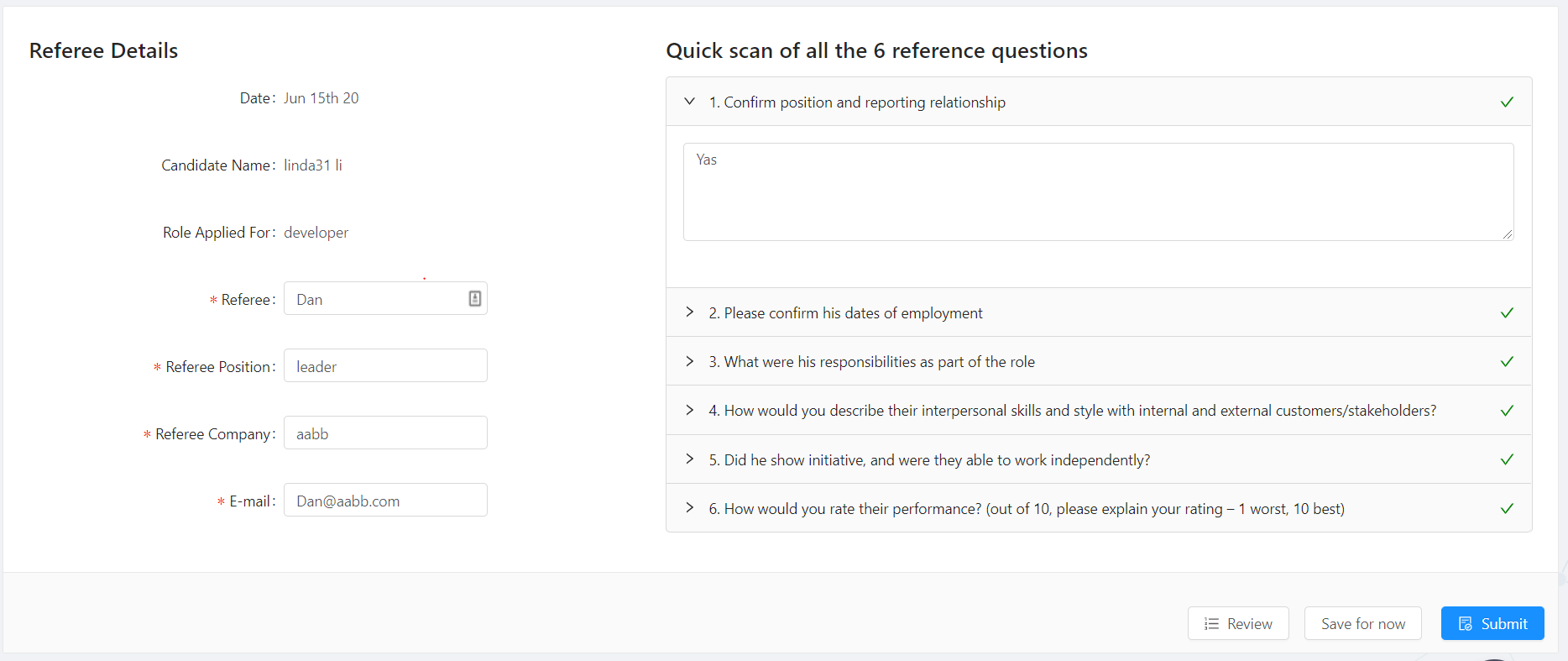
<p>The example we used here is to monitor the items' validation status for two children forms. the whole structure is looks like this:</p>
<figure data-type="image" tabindex="1"><img src="https://Helena-Li.github.io/post-images/1592782098455.PNG" alt=""></figure>
<p>There parent component is a card, and there're two forms inside, left referee details and right questions. When we submit the page, we hope to get the status of the both children forms.</p>
<h3 id="example-codes-for-children-parts">Example codes for children parts</h3>
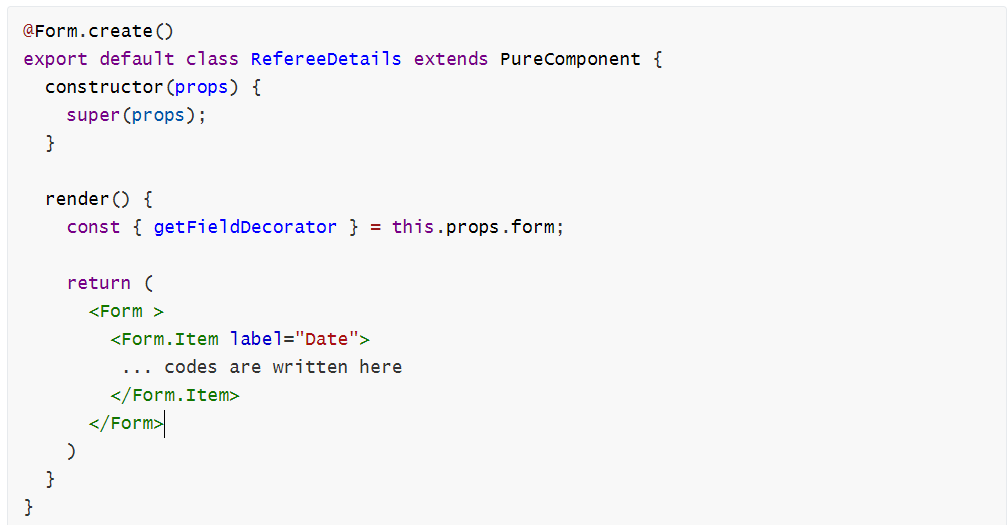
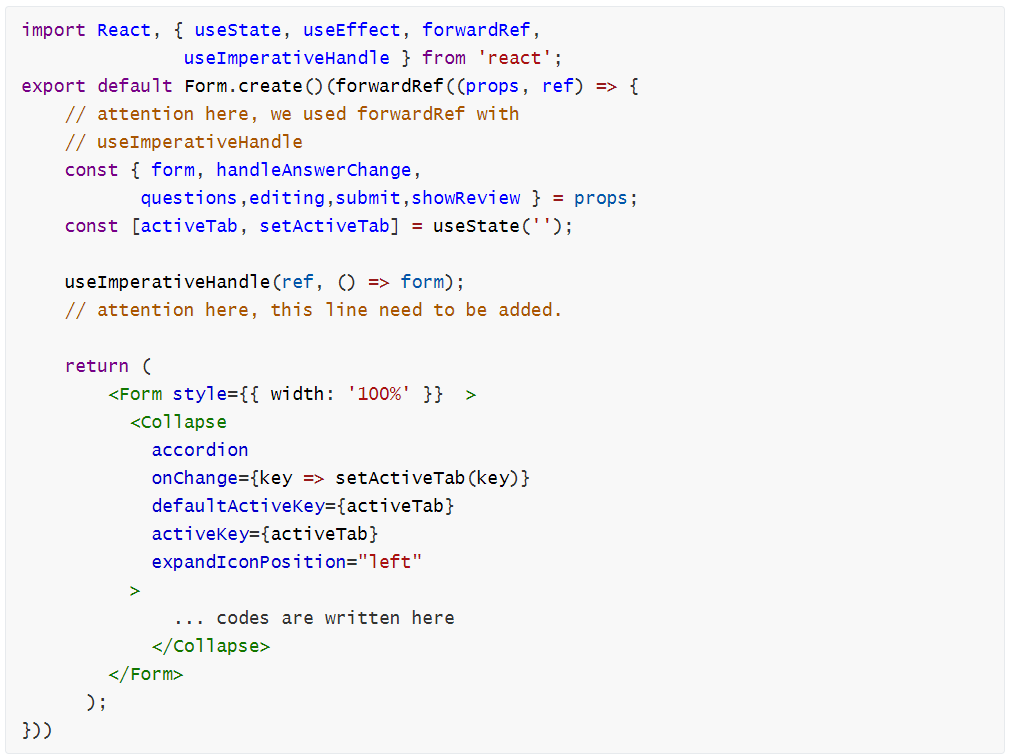
<p>In this case we use class component for the left side, and use function component for the right one.</p>
<p><img src="https://Helena-Li.github.io/post-images/1592782356077.PNG" alt=""><br>
<img src="https://Helena-Li.github.io/post-images/1592782363187.PNG" alt=""></p>
<p>It could be seen, for the class children component, we don't need to do anything in it to get the status, all the efforts are outside it. In term of the function one, we need to use useImperativeHandle and forwardRef.</p>
<pre><code>useImperativeHandle` customizes the instance value that is exposed to parent components when using `ref
</code></pre>
<h3 id="example-codes-for-the-parent-part">Example codes for the parent part</h3>
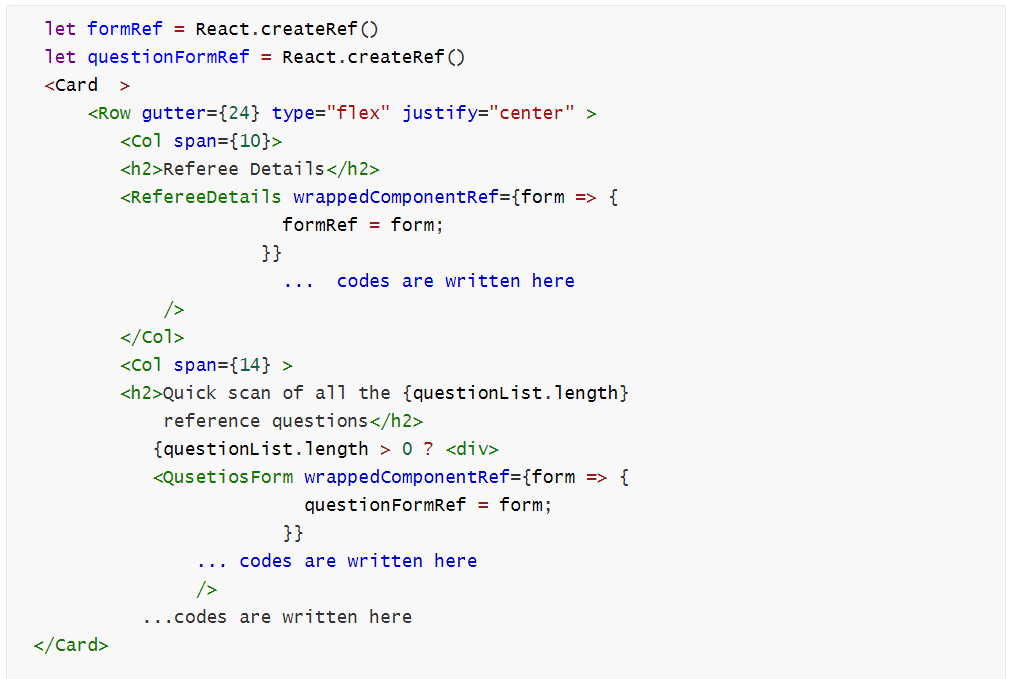
<p>For the parent component, we need to generate the both ref and use them, the codes are looks like this:</p>
<figure data-type="image" tabindex="2"><img src="https://Helena-Li.github.io/post-images/1592782327887.PNG" alt=""></figure>
<p>To ref the form, we use wrappedComponentRef to get the instance.</p>
<p>Then it is easy to get the validation status for both forms through the ref instances. The codes are:</p>
<pre><code class="language-react"> const validateLeft=()=&gt;{
    const {form} =formRef.props
    let result = true
    form.validateFields((errors, values) =&gt; {
      if (errors) {
        result=false;
      }
    });
    return result
  }

  const validateRight=()=&gt;{
    let result = true
    questionFormRef.validateFields((errors, values) =&gt; {
      if (errors) {
        result=false;
      }
    });
    return result
  }

</code></pre>
<p>You might notice, for the class component, we get the form instance by using <code>const {form} =formRef.props</code> . In terms of the hook one, because we send back the &quot;form&quot; in the props, we can use questionFormRef instance directly.</p>
<h3 id="source">Source</h3>
<p>https://3x.ant.design/components/form/</p>
<p>https://reactjs.org/docs/hooks-reference.html</p>
]]></content>
    </entry>
    <entry>
        <title type="html"><![CDATA[Use SendGrid to send email in ASP.NET core]]></title>
        <id>https://Helena-Li.github.io/post/use-sendgrid-to-send-email-in-aspnet-core</id>
        <link href="https://Helena-Li.github.io/post/use-sendgrid-to-send-email-in-aspnet-core">
        </link>
        <updated>2020-05-04T17:40:48.000Z</updated>
        <content type="html"><![CDATA[<p>When registered in a website, we usually need to confirm the register. This time I used SendGrid to send the confirmation via templates in a ASP.NET core project.</p>
<h3 id="easy-way-to-send-a-simple-email">Easy way to send a simple email</h3>
<p>Before using the SendGrid service, we need the following preparations:</p>
<ol>
<li>Have an account in SendGrid.</li>
<li>Get the API key</li>
<li>Set a template</li>
</ol>
<p>Notice, the API key just show you once, keep it properly.</p>
<p>The template I used is dynamic template which can replace some words in the template. It's:</p>
<pre><code class="language-html">  &lt;html&gt;
    &lt;head&gt;
      &lt;title&gt;&lt;/title&gt;
    &lt;/head&gt;
    &lt;body&gt;
        Hello {{name}},
        &lt;br /&gt;&lt;br/&gt;
        registered successful!
        &lt;br /&gt;&lt;br/&gt;
        Please confirm your email address using this link:
        &lt;a href=&quot;{{redirect}}&quot;&gt; Comfirm Your Account &lt;/a&gt;
        &lt;br /&gt;&lt;br/&gt;
        This link will expired in 7 days.
    &lt;/body&gt;
  &lt;/html&gt;
</code></pre>
<p>You can see, the &quot;name&quot;, and &quot;redirect&quot; can be replaced when you set your codes in C# like this:</p>
<pre><code class="language-c#">public class TemplateEmailData
    {
        [JsonProperty(&quot;subject&quot;)]
        public string Subject { get; set; }
        [JsonProperty(&quot;name&quot;)]
        public string Name { get; set; }
        [JsonProperty(&quot;redirect&quot;)]
    }
</code></pre>
<p>So the SendGrid can handle the request.</p>
<p>Before writing codes, we need to install SendGrid  package. In package manager console, use command:</p>
<pre><code>PM&gt; Install-Package SendGrid
</code></pre>
<p>Then, the codes are:</p>
<pre><code class="language-c#">[HttpPost]
[AllowAnonymous]
public async Task&lt;IActionResult&gt; Register(RegisterViewModel model)
        {
            if (ModelState.IsValid)
            {
               // other codes...

                    var dynamicTemplateData = new TemplateEmailData
                    {
                        Subject = &quot;send grid dynamic&quot;,
                        Name = &quot;Linda&quot;,
                        RedirectUrl = 
                        &quot;https://localhost:44356/account/&quot;
                    };
                    emailService.SendEmail(dynamicTemplateData);
                // other codes... 
            }
            return View(model);
        }   
</code></pre>
<pre><code class="language-c#"> public async void SendEmail(TemplateEmailData templateEmailData)
{
            try
            {
                // your own SendGridApiKey
                var client = new SendGridClient(SendGridApiKey);
                var msg = new SendGridMessage();
                msg.SetFrom(new EmailAddress(&quot;test@gmail.com&quot;, &quot;t&quot;));
                msg.AddTo(new EmailAddress(&quot;test@gmail.com&quot;, &quot;Linda&quot;));
                msg.SetTemplateId(TemplateID);
				// You own TemplateID
                msg.SetTemplateData(templateEmailData);
                var response = await client.SendEmailAsync(msg);
            }
            catch (Exception e)
            {
                throw;
}
</code></pre>
<p>The interesting thing is that we don't need a credential for this service, just need an API key and template ID.</p>
<h3 id="iterations-for-template">Iterations for template</h3>
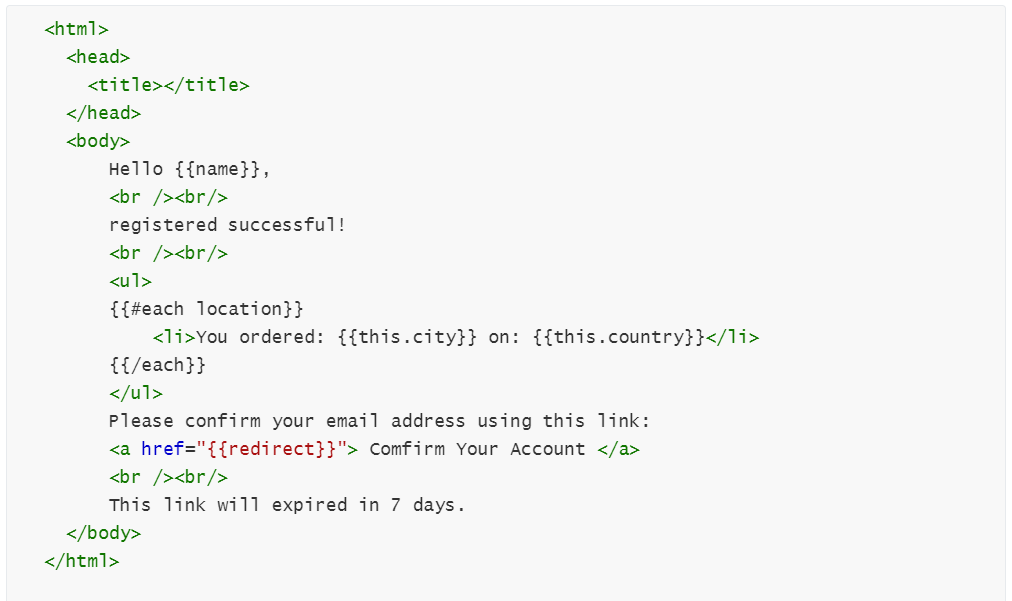
<p>When we need to dynamically generate iterations from a list or array, the template is looks like this：<br>
<img src="https://Helena-Li.github.io/post-images/1588395723037.PNG" alt=""></p>
<p>And the codes constantly changed to:</p>
<pre><code class="language-c#">public class TemplateEmailData
    {
        [JsonProperty(&quot;subject&quot;)]
        public string Subject { get; set; }
        [JsonProperty(&quot;name&quot;)]
        public string Name { get; set; }
        [JsonProperty(&quot;redirect&quot;)]
        public string RedirectUrl { get; set; }
        [JsonProperty(&quot;location&quot;)]
        public List&lt;Location&gt; Locations { get; set; }
    }
    public class Location
    {
        [JsonProperty(&quot;city&quot;)]
        public string City { get; set; }
        [JsonProperty(&quot;country&quot;)]
        public string Country { get; set; }
    }
</code></pre>
<h3 id="source">Source</h3>
<p>https://sendgrid.com/docs/for-developers/sending-email/using-handlebars/#iterations</p>
<p>https://github.com/sendgrid/sendgrid-csharp</p>
]]></content>
    </entry>
    <entry>
        <title type="html"><![CDATA[Hooks in React]]></title>
        <id>https://Helena-Li.github.io/post/hooks-in-react</id>
        <link href="https://Helena-Li.github.io/post/hooks-in-react">
        </link>
        <updated>2020-03-12T14:30:46.000Z</updated>
        <content type="html"><![CDATA[<h3 id="why-need-to-use-hooks">Why need to use hooks?</h3>
<p>There are 3 drawbacks by using class component in React:</p>
<ol>
<li>Big component is hard to split or restructure</li>
<li>Logic is scattered in methods which can lead to redundant logic.</li>
<li>Coding model is complicated, such as render, props, etc.</li>
</ol>
<p>To simplify coding in React, Hooks is designed, used in pure methods, which don't need class to complete a component. Notice, Hooks don't work inside classes!</p>
<h3 id="build-in-hooks">Build-in Hooks</h3>
<p>There are 4 commonly used hooks: useState(), useContext(), useReducer() and useEffect().</p>
<p>useState() is used when you need to manipulate state in a function.</p>
<pre><code class="language-react">import React, {useState} from &quot;react&quot;

export default function Fruit(){
    //declare hookks, initial value for fruit is banana, setFruit is used to handle changes.
    const [fruit, setFruit]=useState(&quot;banana&quot;);
    
    function handleChange(){
        return setFruit(&quot;orange&quot;);
    }
    return &lt;button onclick={handleChange}&gt;{fruit}&lt;/button&gt;
    // can directly use fruit
}
</code></pre>
<p>useEffect() lets you perform side effects. general ways to use it is to request data. Effects are run after updating the DOM. Unlike componentDidMount, effects don't block the browser from updating the screen. Major effects don't need to happen synchronously, so it makes the app more responsive.</p>
<pre><code class="language-react">function User(Id){
    const [loading, setLoading]=useState(true);
    const [user, setUser]=useState({});
    
    useEffect(()=&gt;{
        setLoading(true);
        fetch(`https://sample/${Id}`)
        .then(response=&gt;response.json())
        .then(data=&gt;{
            setUser(data);
            setLoading(false);
        });
    },[Id]);
    if(loading===true){
        return &lt;p&gt;Loading...&lt;/p&gt;
    }
    
    return(
        &lt;div&gt;
          &lt;p&gt; User name: {user.Name}&lt;/p&gt;
        &lt;/div&gt;
    )
}
</code></pre>
<p>Notice: for needs of executing effect each time there is a update, can delete the second parameter in useEffect(); for needs of render once, can make the second parameter as [], so there is no change for a [], it will only executed once.</p>
]]></content>
    </entry>
    <entry>
        <title type="html"><![CDATA[Use IOptions for intergration of Google Docs]]></title>
        <id>https://Helena-Li.github.io/post/use-ioptions-for-intergration-of-google-docs</id>
        <link href="https://Helena-Li.github.io/post/use-ioptions-for-intergration-of-google-docs">
        </link>
        <updated>2020-02-04T23:44:04.000Z</updated>
        <content type="html"><![CDATA[<p>In the integration of Google Docs, I used a credential file to provide client Id and keys. However, sensitive data should not be used directly in codes. This blog is to use IOptions in ASP.Net to achieve this.</p>
<p>There are 4 steps:</p>
<ol>
<li>create a class to store sensitive data</li>
<li>set up appsettings.json</li>
<li>register in startup.cs</li>
<li>use the sensitive data</li>
</ol>
<h3 id="1-create-a-class-to-store-sensitive-data">1. create a class to store sensitive data</h3>
<pre><code class="language-c#">public class GoogleDocSettings
    {
        public string ApplicationNameSetting { get; set; }
        public string TemplateDocId { get; set; }
        public string ClientId { get; set; }
        public string ClientSecret { get; set; }
    }
</code></pre>
<h3 id="2-set-up-appsettingsjson">2. set up appsettings.json</h3>
<pre><code class="language-c#">&quot;googleDoc&quot;: {
    &quot;applicationNameSetting&quot;: &quot;Google Docs API&quot;,
    &quot;templateDocId&quot;: &quot;188888888888888************80c&quot;,
    &quot;clientId&quot;: &quot;597*******1-g*************q.apps.googleusercontent.com&quot;,
    &quot;clientSecret&quot;: &quot;l**********P&quot;
  }

</code></pre>
<h3 id="3-register-in-startupcs">3. register in startup.cs</h3>
<pre><code class="language-c#">services.Configure&lt;GoogleDocSettings&gt;(options =&gt;
            Configuration.GetSection(&quot;googleDoc&quot;).Bind(options));

</code></pre>
<h3 id="4-use-the-sensitive-data">4. use the sensitive data</h3>
<pre><code class="language-c#">private readonly GoogleDocSettings googleDoc;

public GoogleService(
                      IOptions&lt;GoogleDocSettings&gt; googleOptions)
{
    this.googleDoc = googleOptions.Value;
}

</code></pre>
<pre><code class="language-c#">public async Task&lt;bool&gt; UseGoogleDocs(DemoViewModel model)
        {
            try
            {
                UserCredential credential;
                credential = GoogleWebAuthorizationBroker.AuthorizeAsync(
                    new ClientSecrets { ClientId = googleDoc.ClientId, 
                    ClientSecret = googleDoc.ClientSecret },
                    Scopes,
                    &quot;user&quot;,
                    CancellationToken.None,
                    new FileDataStore(credPath, true)).Result;

                // Create Google Docs API service.
                var service = new DocsService(new BaseClientService.Initializer()
                {
                    HttpClientInitializer = credential,
                    ApplicationName = googleDoc.ApplicationNameSetting,
                });

                var serviceDrive = new DriveService(
                new BaseClientService.Initializer()
                {
                    HttpClientInitializer = credential,
                    ApplicationName = googleDoc.ApplicationNameSetting,
                });

                // rest codes...
</code></pre>
<p>That is it!</p>
]]></content>
    </entry>
    <entry>
        <title type="html"><![CDATA[React.createElement: type is invalid ]]></title>
        <id>https://Helena-Li.github.io/post/reactcreateelement-type-is-invalid</id>
        <link href="https://Helena-Li.github.io/post/reactcreateelement-type-is-invalid">
        </link>
        <updated>2020-02-04T12:44:23.000Z</updated>
        <content type="html"><![CDATA[<h1 id="-expected-a-string-or-a-classfunction-but-got-object">-- expected a string or a class/function but got object</h1>
<p>Use react to implement a simple render using List like this:</p>
<pre><code class="language-react">import SuggestionCard from './FakeData';

&lt;List
  loading={this.props.isLoading}
  itemLayout=&quot;vertical&quot;
  grid={{ column: 1 }}
  size=&quot;large&quot;
  dataSource={talentSuggestions}
  renderItem={item =&gt; (
    &lt;List.Item key={item.id}&gt;
      &lt;SuggestionCard SuggestionData={item} ContactTalent={this.clickContack}/&gt;
    &lt;/List.Item&gt;
              )}
/&gt;
</code></pre>
<pre><code class="language-react">export default class SuggestionCard extends Component {
render() {
    const suggestionItem = this.props.SuggestionData;

    return (
      &lt;Card 
        title=&quot;HI title&quot;&gt;
        &lt;Card.Meta
          title=&quot;Skills&quot;
          description={
            &lt;div&gt;
              &lt;Tag&gt;skill 1&lt;/Tag&gt;
              &lt;Tag&gt;skill 2&lt;/Tag&gt;
              &lt;Tag&gt;skill 3&lt;/Tag&gt;
            &lt;/div&gt;
          }
        /&gt;
      &lt;/Card&gt;
    );
  }
}
</code></pre>
<p>But got a error message of : React.createElement: type is invalid -- expected a string (for built-in components) or a class/function (for composite components) but got: object.</p>
<p>I checked it again and again, and then found that the error occur because of the wrong import path! I should import this component from</p>
<pre><code class="language-react">import SuggestionCard from './SuggestionCard';
</code></pre>
<p>So this bug was fixed. How ridiculous~~~</p>
<p>Anyway, happy development. Haha~~~~</p>
]]></content>
    </entry>
    <entry>
        <title type="html"><![CDATA[Ways of using AutoMapper in .NET core]]></title>
        <id>https://Helena-Li.github.io/post/two-ways-to-use-automapper-in-net-core</id>
        <link href="https://Helena-Li.github.io/post/two-ways-to-use-automapper-in-net-core">
        </link>
        <updated>2020-01-25T04:29:54.000Z</updated>
        <content type="html"><![CDATA[<p>Previously, I use this way to map an entity to a data transfer object(DTO):</p>
<pre><code class="language-c#">public class Company
    {
        public int Id { get; set; }
        public string Name { get; set; }
        public string Introduction { get; set; }

        public ICollection&lt;Employee&gt; Employees { get; set; }
    }
    
    
public class CompanyDto
    {
        public int Id { get; set; }
        public string Name { get; set; }
    }

</code></pre>
<pre><code class="language-c#">[ApiController]
    [Route(&quot;company&quot;)]
    public class CompanyController : Controller
    {
        private readonly ICompanyRepository companyRepository;
        private readonly IMapper mapper;

        public CompanyController(ICompanyRepository companyRepository,IMapper mapper)
        {
            this.companyRepository = companyRepository;
            this.mapper = mapper;
        }
        [HttpGet]
        [Route(&quot;&quot;)]
        public async Task&lt;ActionResult&lt;IEnumerable&lt;CompanyDto&gt;&gt;&gt; GetCompanies()
        {
            var companies = await companyRepository.GetCompaniesAsync();
            var companyDtos = mapper.Map&lt;IEnumerable&lt;CompanyDto&gt;&gt;(companies);
            var model = new List&lt;CompanyDto&gt;();
            foreach (var company in companies)
            {
                CompanyDto companyDto = new CompanyDto
                {
                    Id=company.Id,
                    Name=company.Name
                };
                model.Add(companyDto);
            }
            return Ok(model);
        }
    }
</code></pre>
<p>However, if we use AutoMapper, the situation becomes much easier. There are 4 steps.</p>
<h5 id="install-package">Install package :</h5>
<p>Install AutoMapper.Extensions.Microsoft.DependencyInjection by Nuget package manager.</p>
<h5 id="create-profile">Create profile</h5>
<p>Create a class to build profile:</p>
<pre><code class="language-c#">using AutoMapper;

public class CompanyProfile:Profile
    {
        public CompanyProfile()
        {
            CreateMap&lt;Company, CompanyDto&gt;();
        }
    }
</code></pre>
<h5 id="set-up-startupcs">Set up startup.cs</h5>
<p>There are two way of append AutoMapper :</p>
<pre><code class="language-c#">public void ConfigureServices(IServiceCollection services)
{
	// add AutoMapper
	services.AddAutoMapper();
}
</code></pre>
<p>or</p>
<pre><code class="language-c#">public void ConfigureServices(IServiceCollection services)
{
    // add AutoMapper
            var mappingConfig = new MapperConfiguration(mc =&gt;
            {
                mc.AddProfile(new CompanyProfile());
            });

            IMapper mapper = mappingConfig.CreateMapper();
            services.AddSingleton(mapper);
}
</code></pre>
<p>These two ways get almost same results.</p>
<h5 id="using-imapper-in-a-controller">Using IMapper in a controller</h5>
<p>By using AutoMapper, the codes are as simple as follow:</p>
<pre><code class="language-c#">    [ApiController]
    [Route(&quot;company&quot;)]
    public class CompanyController : Controller
    {
        private readonly ICompanyRepository companyRepository;
        private readonly IMapper mapper;

        public CompanyController(ICompanyRepository companyRepository,
                                 IMapper mapper)
        {
            this.companyRepository = companyRepository;
            this.mapper = mapper;
        }
        [HttpGet]
        public async Task&lt;ActionResult&lt;IEnumerable&lt;CompanyDto&gt;&gt;&gt; GetCompanies()
        {
            var companies = await companyRepository.GetCompaniesAsync();
            // use automapper to map companies to companyDtos
            var companyDtos = mapper.Map&lt;IEnumerable&lt;CompanyDto&gt;&gt;(companies);
            return Ok(companyDtos);
        }

        [HttpPut(&quot;companyId&quot;)]
        public async Task&lt;ActionResult&gt; UpdateCompanies(
            int companyId,CompanyDto companyDto )
        {
            var companyEntity = await companyRepository.GetCompaniesAsync(companyId);
            // map companyEntity to companyDto
            // update values in companyDto
            // map back companyDto to Company object
            // this three things simple done by following sentence
            mapper.Map(companyDto, companyEntity);
            await companyRepository.UpdateCompany(companyEntity)
            return NoContent();
        }
    }
</code></pre>
<p>Notice:</p>
<ol>
<li>Entities can either contain more properties or less properties than target DTO</li>
<li>If the name of the Properties are different between two classes, or people need to combine two properties, it also works fine</li>
<li>People can combine two entities into one DTO</li>
</ol>
<h5 id="1contain-more-or-less-properties">1.Contain more or less properties</h5>
<p>As is seen in the beginning, Company class contains a &quot;Introduction&quot; property, using AutoMapper can automatic ignore this property without a null exception. If Company contains less property, for instance, CompanyDto contains a &quot;Location&quot; property, after mapping, the &quot;Location&quot; field in the object will be null.</p>
<h5 id="2-difference-or-combination">2. Difference or Combination</h5>
<p>When property's name is different between the classes, there are methods in AutoMapper can be used. For example, we change the name property to CompayName.</p>
<pre><code class="language-c#">public class Company
    {
        public int Id { get; set; }
        public string CompanyName { get; set; }
        public string Introduction { get; set; }

        public ICollection&lt;Employee&gt; Employees { get; set; }
    }
    
    
public class CompanyDto
    {
        public int Id { get; set; }
        public string Name { get; set; }
    }

</code></pre>
<p>Create mapper can be:</p>
<pre><code class="language-c#">CreateMap&lt;Company, CompanyDto&gt;()
                .ForMember(dest=&gt;dest.CompanyName,
                opt=&gt;opt.MapFrom(src=&gt;src.Name));
</code></pre>
<p>Or if you want to combine two property together in Employee:</p>
<pre><code class="language-c#">public class Employee
    {
        public int Id { get; set; }
        public int CompanyId { get; set; }
        public string FirstName { get; set; }
        public string LastName { get; set; }

        public Company Company { get; set; }
    }
    
 public class EmployeeDto
    {
        public int Id { get; set; }
        public int CompanyId { get; set; }

        public string Name { get; set; }
        public string CompanyName { get; set; }
    }
    
</code></pre>
<p>Create mapper can be:</p>
<pre><code class="language-c#">CreateMap&lt;Employee, EmployeeDto&gt;()
                .ForMember(dest =&gt; dest.Name,
                opt =&gt; opt.MapFrom(src =&gt; $&quot;{src.FirstName} {src.LastName}&quot;));
</code></pre>
<h5 id="3-combine-two-entities-together">3. Combine two entities together</h5>
<p>When People want to combine Employee and Company to EmployeeDto, it can be:</p>
<pre><code class="language-c#">[HttpGet]
[Route(&quot;&quot;)]
public async Task&lt;ActionResult&lt;IEnumerable&lt;EmpDto&gt;&gt;&gt; GetCompanies()
{
   var companies = await companyRepository.GetCompaniesAsync();
   var emps = await companyRepository.GetEmpAsync();
   var empDtos = mapper.Map&lt; IEnumerable&lt;Company&gt;,
                 IEnumerable&lt;CompDto&gt;&gt;(companies);
   mapper.Map&lt;IEnumerable&lt;Employee&gt;,IEnumerable &lt;CompDto&gt;&gt;(emps, empDtos);
   return Ok(empDtos);
}
</code></pre>
]]></content>
    </entry>
    <entry>
        <title type="html"><![CDATA[Integration with Google Docs to export documents in ASP.NET core ]]></title>
        <id>https://Helena-Li.github.io/post/integration-with-google-docs-to-export-documents-in-aspnet-core</id>
        <link href="https://Helena-Li.github.io/post/integration-with-google-docs-to-export-documents-in-aspnet-core">
        </link>
        <updated>2020-01-03T08:06:23.000Z</updated>
        <content type="html"><![CDATA[<!-- more -->
<p>APIs provided by Google Docs include creating new document, getting a document and  updating a document. However, the function is limited. For example, people can't copy paragraphs; insert text or update styles need the index of the text in Google docs.</p>
<p>Because there are not many example codes for ASP.NET core with C#, I write this article.</p>
<p>To integrate with Google Docs, there are steps:</p>
<ol>
<li>turn on the Google Docs API.</li>
<li>Prepare the project</li>
<li>Manipulate docs in Google Docs</li>
</ol>
<h2 id="turn-on-the-google-docs-api-google-drive-api">Turn on the Google Docs API &amp; Google Drive API</h2>
<p>Creating credential can either refer the official website of Google Docs https://developers.google.com/docs/api/quickstart/dotnet or this article https://thecodehubs.com/google-drive-integration-in-asp-net-mvc/.</p>
<p>Generally, the processing of create credential of Google Docs and Google drive are almost the same. Since I need to copy documents, I need to enable the both APIs. Under the same project in &quot;console.developers.google.com&quot; in &quot;Library&quot; tag, search for them and click enable button.</p>
<h2 id="prepare-the-project">Prepare the project</h2>
<p>Open the NuGet Package Manager Console, install NuGet package of the both API.</p>
<pre><code>Install-Package Google.Apis.Docs.v1
Install-Package Google.Apis.Drive.v3
Install-Package Google.Apis.Drive.v2
</code></pre>
<h2 id="manipulate-docs-in-google-docs">Manipulate docs in Google docs</h2>
<p>I create a tool class for the functions of manipulate docs, and simply use them in the controller without any set up in Program.cs or Startup.cs. The authentication is done also in the tool class.</p>
<h3 id="create-credential-service">Create credential &amp; service</h3>
<pre><code class="language-c#">using Google.Apis.Auth.OAuth2;
using Google.Apis.Docs.v1;
using Google.Apis.Docs.v1.Data;
using Google.Apis.Services;
using Google.Apis.Util.Store;
using System.Threading;
using Microsoft.AspNetCore.Hosting;
using Google.Apis.Drive.v3;
namespace Talent.Api.Domain.Services
{
    public class ProfileService : IProfileService
    {
        static string[] Scopes = { DocsService.Scope.Documents,DocsService.Scope.Drive };
        static string ApplicationName = &quot;Google Docs API Export&quot;;
        static string TemplateDocId = &quot;1WwKfzg0dSjEnZRaOIchD2TT8RqIORsCBfnGpCil1R0c&quot;;
        public async Task&lt;bool&gt; ExportProfileToGoogleDocs(TalentProfileViewModel model)
        {
            try
            {
                UserCredential credential;

                using (var stream = new FileStream(hostingEnvironment.ContentRootPath + 
                &quot;//credentials.json&quot;, FileMode.Open, FileAccess.Read))
                {
                    string credPath = 
                        Environment.GetFolderPath(Environment.SpecialFolder.Personal);
                    credPath = Path.Combine(credPath,
                            $&quot;./credentials/{model.Id}/credentials.json&quot;);

                    credential = GoogleWebAuthorizationBroker.AuthorizeAsync(
                        GoogleClientSecrets.Load(stream).Secrets,
                        Scopes,
                        &quot;user&quot;,
                        CancellationToken.None,
                        new FileDataStore(credPath, true)).Result;
                }
                
                // Create Google Docs API service.
                var service = new DocsService(new BaseClientService.Initializer()
                {
                    HttpClientInitializer = credential,
                    ApplicationName = ApplicationName,
                });

                var serviceDrive = new DriveService(new BaseClientService.Initializer()
                {
                    HttpClientInitializer = credential,
                    ApplicationName = ApplicationName,
                });
            }
        }
    }
}
</code></pre>
<h3 id="copy-template">Copy template</h3>
<p>Use template to generate a document, since replace the text in template with wanted text can maintain the style of the content. So I don't need to specify every style of a letter.</p>
<pre><code class="language-c#">// copy template 
var copyDoc = serviceDrive.Files.Copy(new Google.Apis.Drive.v3.Data.File() { Name = 
      $&quot;Export Profile for {model.FirstName}&quot; },TemplateDocId).Execute();
var docCopyId = copyDoc.Id;
var doc = service.Documents.Get(docCopyId).Execute();
</code></pre>
<p>If you look at the network of the request of &quot;get()&quot;, you can see the structure of the document in Google Doc.</p>
<h3 id="export-text-into-the-document">Export text into the document</h3>
<p>I get some data from the front-end to export to the document. Here I use the tool class to generate the request list.</p>
<pre><code class="language-c#"> // export data to google doc
ExportDataToGoogleDocs export = new ExportDataToGoogleDocs();
List&lt;Request&gt; requests = export.GetRequest(model, doc.Body.Content);

BatchUpdateDocumentRequest body = new BatchUpdateDocumentRequest() { Requests = requests };
BatchUpdateDocumentResponse response = service.Documents
                        .BatchUpdate(body, doc.DocumentId).Execute();
</code></pre>
<h3 id="codes-in-the-tool-class">Codes in the tool class</h3>
<p>There are codes of insert text, replace text, update text style, create and clear bullet, etc.</p>
<pre><code class="language-c#">public class ExportDataToGoogleDocs
    {
        public List&lt;Request&gt; GetRequest(DataViewModel model, 
                                        IList&lt;StructuralElement&gt; DocContent)
        {
            try
            {
                List&lt;Request&gt; requests = new List&lt;Request&gt;();
                string text = null;
                if (model?.Certifications.Count &gt; 0)
                {
                    int index = GetIndex(&quot;{{certification}}&quot;, DocContent);
                    if (index &gt; 0)
                    {
                        int length = 0;
                        for (int i = model.Certifications.Count; i &gt; 0; i--)
                        {
                            var cert = model.Certifications[i - 1];
                            requests.Add(InsertTextRequest(cert.Name + &quot;, &quot;
                                + cert.From + &quot;, &quot; + cert.Year + &quot;\n&quot;, index));
                            length = (cert.Name + &quot;, &quot; + cert.From
                                + &quot;, &quot; + cert.Year).Length;
                            requests.Add(UpdateTextStyleRequest(index, length));
                            length = cert.Name.Length;
                            requests.Add(UpdateTextStyleRequest(index, length, 11.0, 
                                                                true));
                        }
                    }
                }
                else
                {
                    text = &quot;Your certification\n&quot;;
                }
                requests.Add(NewReplaceRequest(&quot;{{certification}}&quot;, text));

                text = null;
                if (model.Education.Count &gt; 0)
                {
                    int index = GetIndex(&quot;{{education}}&quot;, DocContent);
                    if (index &gt; 0)
                    {
                        int length = 0;
                        for (int i = model.Education.Count; i &gt; 0; i--)
                        {
                            var education = model.Education[i - 1];
                            requests.Add(InsertTextRequest(education.Degree + &quot;, &quot;
                                + education.YearOfGraduation + &quot;, &quot; + 
                                education.InstituteName
                                + &quot;, &quot; + education.Country + &quot;\n&quot;, index));
                            length = (education.Degree + &quot;, &quot; + 
                                education.YearOfGraduation + &quot;, &quot;
                                + education.InstituteName + &quot;, &quot; + 
                                education.Country).Length;
                            requests.Add(UpdateTextStyleRequest(index, length));
                            length = education.Degree.Length;
                            requests.Add(UpdateTextStyleRequest(index, length, 11.0, 
                                                                true));
                        }
                    }
                }
                else { text = &quot;Your education\n&quot;; }
                requests.Add(NewReplaceRequest(&quot;{{education}}&quot;, text));

                text = null;
                if (model.Experience.Count &gt; 0)
                {
                    int index = GetIndex(&quot;{{experience}}&quot;, DocContent);
                    if (index &gt; 0)
                    {
                        for (var i = model.Experience.Count; i &gt; 0; i--)
                        {
                            var experience = model.Experience[i - 1];
                            foreach (var desc in 
                                     experience.Responsibilities.Split(&quot;\n&quot;).Reverse())
                            {
                                if (desc.Length == 0) continue;
                                requests.Add(InsertTextRequest(desc + &quot;\n&quot;, index));
                                requests.Add(UpdateTextStyleRequest(index, desc.Length));
                                requests.Add(AddBulletStyleRequest(index, desc.Length));
                            }
                            requests.Add(InsertTextRequest(experience.Position + &quot;\n&quot;, 
                                                           index));
                            requests.Add(ClearBulletStyleRequest(index));
                            requests.Add(UpdateTextStyleRequest(index,
                                experience.Position.Length, 11.0, true));
                            var info = experience.Company + &quot;, &quot; + 
                                experience.Start.ToShortDateString()
                                + &quot; - &quot; + experience.End.ToShortDateString() + &quot;\n&quot;;
                            requests.Add(InsertTextRequest(info, index));
                            requests.Add(UpdateTextStyleRequest(index, info.Length));
                            requests.Add(UpdateTextStyleRequest(index, 
                               experience.Company.Length, 11.0, true));
                        }
                    }
                }
                else { text = &quot;Your experience\n&quot;; }
                requests.Add(NewReplaceRequest(&quot;{{experience}}&quot;, text));

                text = null;
                int skillIndex = GetIndex(&quot;{{skills}}&quot;, DocContent);
                if (skillIndex &gt; 0)
                {
                    if (model.Skills.Count &gt; 0)
                    {
                        foreach (var skill in model.Skills.AsEnumerable().Reverse())
                        {
                            requests.Add(InsertTextRequest(skill.Name + &quot;\n&quot;, 
                                                           skillIndex));
                            requests.Add(AddBulletStyleRequest(skillIndex,
                                                               skill.Name.Length));
                        }
                    }
                    else { text = &quot;Your skills\n&quot;; }
                    requests.Add(NewReplaceRequest(&quot;{{skills}}&quot;, text));
                }

                text = (model.FirstName.Length &gt; 0 &amp;&amp; model.LastName.Length &gt; 0) ?
                     model.FirstName + &quot; &quot; + model.MiddleName + &quot; &quot; + model.LastName
                    : &quot;Your Name&quot;;
                requests.Add(NewReplaceRequest(&quot;{{name}}&quot;, text));

                text = model.Address.City.Length &gt; 0 &amp;&amp; model.Address.Country.Length &gt; 0
                    &amp;&amp; model.Address.Street.Length &gt; 0 ?
                    model.Address.Number + &quot; &quot; + model.Address.Street + &quot;, &quot; + 
                    model.Address.Suburb + &quot;, &quot;
                    + model.Address.City + &quot;, &quot; + model.Address.Country :
                    &quot;Your address&quot;;
                requests.Add(NewReplaceRequest(&quot;{{address}}&quot;, text));

                text = model.Phone ?? &quot;021 *** ***&quot;;
                requests.Add(NewReplaceRequest(&quot;{{phone}}&quot;, text));

                text = model.Email ?? &quot;name@example.com&quot;;
                requests.Add(NewReplaceRequest(&quot;{{email}}&quot;, text));

                text = model.Summary ?? &quot;Something about you&quot;;
                requests.Add(NewReplaceRequest(&quot;{{summary}}&quot;, text));

                return requests;
            }
            catch (Exception)
            {
                return null;
            }
        }

        private static Request NewReplaceRequest(string preContent, 
                                                 string replaceContent)
        {
            Request request = new Request();
            request.ReplaceAllText = new ReplaceAllTextRequest()
            {
                ContainsText = new SubstringMatchCriteria()
                {
                    Text = (preContent),
                    MatchCase = true
                },
                ReplaceText = replaceContent
            };
            return request;
        }

        private static Request InsertTextRequest(string content, int index)
        {
            Request request = new Request();
            request.InsertText = new InsertTextRequest()
            {
                Text = content,
                Location = new Location() { Index = index }
            };
            return request;
        }

        private static Request AddBulletStyleRequest(int startIndex, int length)
        {
            Request request = new Request();
            request.CreateParagraphBullets = new CreateParagraphBulletsRequest
            {
                Range = new Range { StartIndex = startIndex, EndIndex = startIndex + 
                    length },
                BulletPreset = &quot;BULLET_DISC_CIRCLE_SQUARE&quot;
            };
            return request;
        }

        private static Request ClearBulletStyleRequest(int startIndex)
        {
            Request request = new Request();
            request.DeleteParagraphBullets = new DeleteParagraphBulletsRequest
            {
                Range = new Range { StartIndex = startIndex, EndIndex = startIndex + 1 }
            };
            return request;
        }

        private static Request UpdateTextStyleRequest(int startIndex, int length,
              double fontSize = 11, bool bold = false)
        {
            Request request = new Request();
            request.UpdateTextStyle = new UpdateTextStyleRequest()
            {
                TextStyle = new TextStyle()
                {
                    FontSize = new Dimension() { Magnitude = fontSize, Unit = &quot;PT&quot; },
                    Bold = bold
                },
                Range = new Range() { StartIndex = startIndex, EndIndex = startIndex + 
                    length },
                Fields = &quot;fontSize, bold&quot;
            };
            return request;
        }

        private static int GetIndex(string stringToFind, 
                                    IList&lt;StructuralElement&gt; DocContent)
        {
            var result = DocContent.Where(a =&gt; a.Paragraph != null)
                .FirstOrDefault(x =&gt; x.Paragraph.Elements.Any(
                    y =&gt; y.TextRun.Content.StartsWith(stringToFind, 
                                                      StringComparison.CurrentCulture)
                    ));
            if (result == null)
            {
                return 0;
            }
            return (int)result.StartIndex;
        }

    }
</code></pre>
]]></content>
    </entry>
</feed>